Los mejores launchers para personalizar tu Android

Gracias a los launchers es posible modificar el aspecto de la pantalla de inicio de cualquier dispositivo Android sin necesidad de hacer ningún cambio permanente o instalar una ROM completamente nueva. Se trata de uno de los aspectos más personalizables de cualquier smartphone o tablet. Aquí tienes los más interesantes que puedes encontrar actualmente en Play Store.
Salta directamente a cada sección:
- Pocophone F1 Launcher
- Nova Launcher
- Smart Launcher 5
- Microsoft Launcher
- Apex Launcher
- Niagara Launcher
- Action Launcher
Pocophone F1 Launcher: nacido para correr
Este lanzador de Xiaomi es sobre todo velocidad. El Pocophone F1 se convirtió en uno de los smartphones favoritos de nuestra redacción y el software es fundamental para conseguir tal velocidad El lanzador juega un papel muy importante en esto. De hecho es el launcher que estoy usando ahora mismo, y realmente vuela. La opción de buscar aplicaciones por color también es sorprendentemente intuitiva. Si estás buscando un lanuncher rápido y sencillo para su smartphone Android, no busques más.
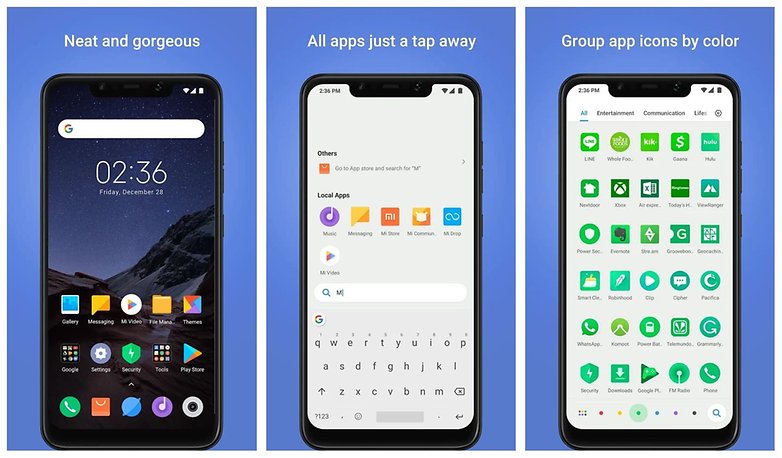
Puedes descargar el POCO Launcher en el siguiente enlace.
Nova Launcher
Nova es uno de los mejores y más extendidos launchers con algunas de las funciones que podemos ver en Pixel Launcher oficial de Google. Incluso le hemos dedicado un artículo para sacarle el máximo partido a todos sus trucos. Muchos ponen esta aplicación como excusa para comprar un dispositivo Android antes que un iPhone, y es fácil de entender por qué.
Nova no es muy impresionante la primera vez que lo abres, parece como otro cualquiera. Pero cuando accedes a sus ajustes es cuando te das cuenta de todo su potencial. Desde cambiar el tamaño de los icono, el color de la fuente, efectos de animación, gestos, animaciones, diseño del cajón de aplicaciones y un largo etcétera. Es la personalización más profunda que puedes tener sin ser root.
${app-com.teslacoilsw.launcher}Smart Launcher 5
Smart Launcher 5 tiene su propio carácter y es una revisión completa de las versiones anteriores del lanzador (que siempre han ocupado algún espacio en nuestra lista). Ahora es más rápido, eso sí se las arregla conserva la simplicidad que le caracteriza. diferente al resto de lanzadores de la lista. Comienza con unos pequeños pasos para configurarlo donde te pregunta que aplicación prefieres para las llamadas, música y fotos de las que tienes instaladas.
Este launcher adaptará sus colores para "hacer juego" con cualquiera de los fondos de pantalla que elijas, así que requiere muy poco esfuerzo hacer que tu smartphone luzca estupendo. Los iconos de Android Oreo son compatibles, por lo que tendrás todas las formas y tamaños que te imagines. De la misma manera te puedes volver loco con los widgets usando tantos como quieras y redimensionándolos sin necesidad de ajustar la cuadrícula.
Smart Launcher 5 es fácil de usar con una mano y mantiene tu smartphone en perfecto orden al clasificar tus aplicaciones en carpetas, que además puedes proteger con un PIN.
${app-ginlemon.flowerfree}Microsoft Launcher
Este lanzador está desarrollado por Microsoft, como te podrás imaginar por su nombre. Antes de que salgas corriendo te diré unas cuantas razones para que lo consideres. En primer lugar tiene un aspecto muy diferente al resto, carece de bloatware y es gratuito, así que no pasa nada por probar.
Este lanzador no pone adornos ni animaciones y está más dirigido a usuarios de tipo comercial. Esto se nota en sus fondos de pantalla bastante planos y pantallas de inicio con títulos como Personas y Recordatorios. Esta ultima es una pantalla dedicada a citas, tareas y recordatorios que no puedes dejar pasar, incluso se puede integrar aplicaciones de tareas como Wunderlist.
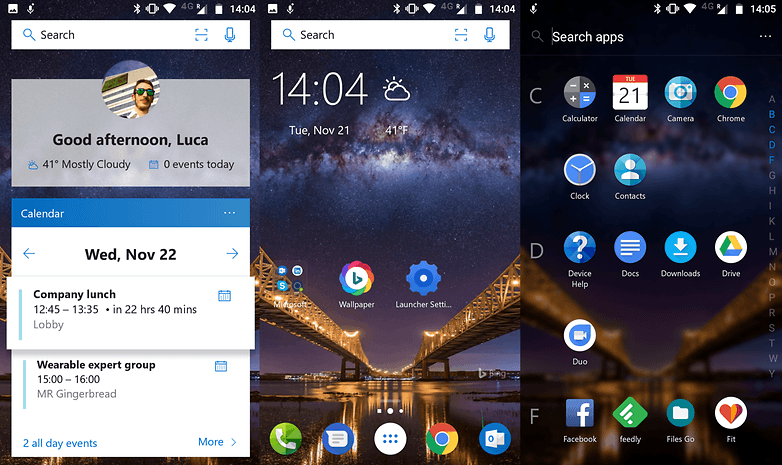
Otra de estas pantallas interesantes es la de Recientes. En ella encontramos archivos y acciones recientes por temas como imágenes, descargas, contactos, etc.
Con Microsoft Launcher puedes utilizar paquetes de iconos personalizados pero no es un lanzador que se centre tampoco en le aspecto visual, su apuesta va totalmente dirigida a la productividad. Desde luego es fresco y único.
${app-com.microsoft.launcher}Apex Launcher
Apex Launcher cuenta con buenas funciones tanto en la versión gratuita como en la de pago, además ninguna de las dos tiene anuncios o bloatware.
Apex se parece bastante a Nova, ofreciendo una gran cantidad de personalización la cual incluso puedes exportar a otros dispositivos gracias a un archivo de configuración. También es compatible con gran número de temas, paquetes de iconos y fondos de pantalla.
Su botón de inicio se puede personalizar para albergar más de una sola acción.
Una de las características más interesante de Apex es que puedes configurar varias barras de aplicaciones en el fondo de la pantalla. Normalmente solo hay cuatro aplicaciones y el acceso cajón de aplicaciones, pero con este lanzador puedes deslizar la barra a los lados para tener más aplicaciones.
${app-com.anddoes.launcher}Niagara Launcher
Si quieres un lanzador minimalista no hay ninguno mejor que el Niagara Launcher, que incluso es más ágil que el popular Evie Launcher que solía estar en esta lista. Puedes tener hasta 8 aplicaciones de acceso frecuente en tu pantalla de inicio. Además, puedes acceder a una lista completa de aplicaciones colocadas en orden alfabético usando la la barra lateral, previsualizándolas o abriendo la lista completa. Está todo súper ordenado. Lo mejor de todo es que es muy veloz, lo que puede brindar una nueva vida a algunos smartphones de gama baja o tablets más antiguas que tengas.
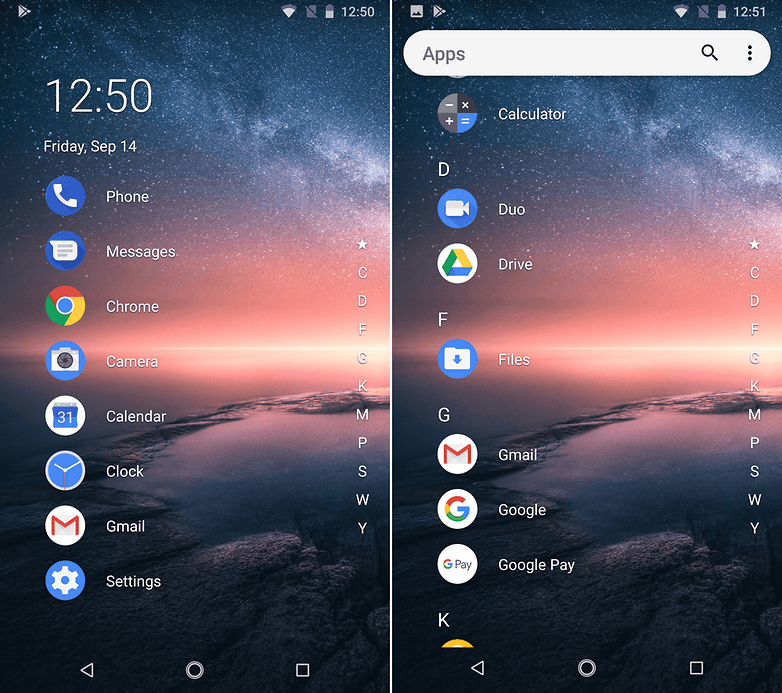
Puedes descargar Niagara Launcher en el siguiente enlace.
Action Launcher: Pixel Edition
Poco después de la presentación de Material Design, el desarrollador Chris Lacy persentaba Action Launcher. Este lanzador fue uno de los primeros en ofrecer una lista de visualización de app alineadas a la izquierda de la pantalla de inicio, a modo del famoso menú hamburguesa. Después el launcher ha ido creciendo en funciones incorporando algunas tan novedosas como Cover y Shutter.
Actualmente cuenta con estilo parecido al Google Pixel Launcher pero las posibilidades de modificación y personalización no tienen nada que ver.
¿Cuál es para ti el mejor launcher para Android?





Mi favorito es él Zenui launcher, porque es simple y ligero y tiene versiones para la versión de android que tengas.
Para mi , el mejor Microsoft launcher.Funcional , eficiente, facil de manejar y para llegar a esa conclusion he perdido la cuenta de Launchers descargados.
-
Admin
12 ene. 2019 Link al comentarioAhora me he quedado con action launcher, ha mejorado mucho desde entonces y esta ganando terreno a Nova ...
Niagara lo probé, pero no me agradó, me parece un buen concepto, pero no me adapto a el.
Alguien me recomienda el launcher más ligero
Están Evie, No Launcher y si quieres personalizar un poco más tu Smartphone, Lightning Launcher, Smart Launcher y otros.
Yo te recomiendo él zenui launcher beta, y después de activarlo actualizalo mediante aptoide y tendrás la versión que es compatible con tu android, es simple y ligero él launcher.
Yo uso Launcher Lawnchair...
Yo lo probé, siento que es un poquito inestable pero funciona bien.
-
Admin
11 oct. 2018 Link al comentarioLo tuve un tiempo, pero no me convenció.
¿Por qué no lo hacen de los peores launchers? Claro, si van a citar un Launcher estilo iPhone, generalicen y ya, no es necesario mencionar uno solo.
Nova sigue siendo el mejor... Increíble lo versátil que puede ser.
Nova para mí ya fue superado. Hay opciones más estables y otras más personalizables.
Aquí veo algo mal... ¿Evie Launcher dónde está?
-
Admin
11 oct. 2018 Link al comentario¿Tu también lo usas Omar?
Si, de verdad es de los más estables que he probado. Aunque no sea tan personalizable, igual no paso todo el día mirando la pantalla de inicio. 😂😂
-
Admin
11 oct. 2018 Link al comentario¿Has probado el nuevo SL 5?, te lo recomiendo, es otro mundo, pruébalo y ya me dirás ...
Ya lo probé, me encanta el Grayscale, es de lo mejorcito. En cuanto al resto está bien, pero me da mucho lag al encender el teléfono. No es muy grave porque la batería es buena, pero a veces reinicio el teléfono y me mosquea un poco. Igual el único que no me da ese problema es Evie, hasta el Launcher de serie me tenía con eso, jejeje.
-
Admin
10 oct. 2018 Link al comentarioComo siempre, volveré a probarlos todos, jajaja, aunque el SL 5 es mi favorito entre los presentados, aunque el Evie se le acerca peligrosamente ...
Mi favorito es el Lightning Launcher. No se lo recomendaría a todo el mundo, pero desde luego es el más personalizable de largo. Si hubiese otro que lo fuese más lo usaría. Comparado con él, Nova es casi un escritorio de iphone, sin exagerar. Hay muy pocos que tengan cosas que no se puedan hacer con LL, pero LL tiene muchas cosas que no se pueden hacer con casi ninguno, y varias que no se pueden hacer con ningún otro. La única pega es la curva de dificultad, mucho más elevada comparada con launchers normales.
Me parece de risa que no aparezca en la lista.